
Here’s something to ponder: How long did it take for cavemen the realize that fire would revolutionize life? Was it shortly after they moved past the immediate fear and confusion? Once they learned it could be used to cook things or stay warm in cold weather? Perhaps once they understood that they could also destroy the fire and thus control it (kind of)?
We’ll never know. But what I do know is that AirTable has revolutionized the way I work. If you’re unfamiliar with AirTable, let me cite someone else’s explanation:
AirTable is a relational database tool that’s also an online collaboration tool. Before you brush it off as boring because of the word ‘database’ know that AirTable is easy to use and extremely versatile. You can use it to manage work, track and organize inventories, plan an event, and much more.”
PC Mag
Now in my own words: AirTable is essentially a spreadsheet; however, it can also generate fillable forms. The spreadsheet will collect the data from these forms, which can then be organized in a meaningful way. I’ve used this tool for various activities, such as a task analysis, content inventories or edits, and bug documenting. Like any tool, there’s a learning curve, but I have been able to onboard clients to collaborating using AirTable with ease. It’s intuitive and– when set up correctly– can be a powerful tool for delegating tasks.
I love it so much that I’ve began to use it outside of work.
You read that right. I am using AirTable as an organizational database-spreadsheet hybrid in my personal life.
It started when my boyfriend, Dustin, and I were talking about features we’d want in a future home. We’d rattle things off here and there, but never document them. Naturally we’d end up repeating the same feedback constantly:
“It’s a nice home, but there’s so much carpet.”
“The basement isn’t finished”
“There’s no bath in the house– only showers.”
“How much work are you willing put into this house?”
So one night I sat down at my computer with a dram of Kentucky Owl 11-year and created an AirTable. I jotted down as many features as I could think of, organized them by category (e.g. Kitchen, Bathrooms, Bedrooms, etc.), and created columns for Dustin and me to rank them by priority. It ended up looking something like this:
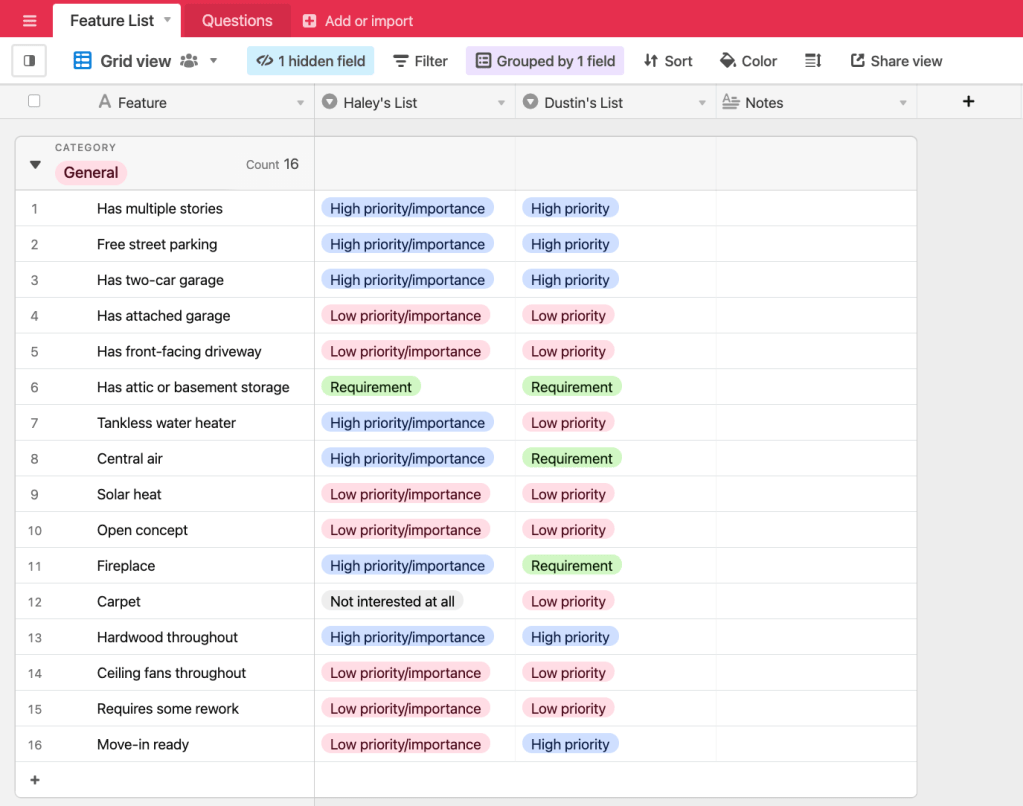
I also created another sheet with a list of questions regarding aspects like budget, number of bedrooms and bathrooms, maximum willing to spend on property taxes, and so on and so forth.
While a very silly use-case, it was extremely effective. Dustin is very tech-savvy but it’s pretty impressive that I didn’t have to do any onboarding for AirTable. He simply opened the link I sent, clicked around for a few seconds, and immediately began adding his input. It’s so nice to be able to send an email that says, “do this” and not get a reply that says, “how?!”
I’ve since developed a few different AirTables for various information or tasks. For example, I’ve documented home improvement tasks that need to be completed before we move. This one has columns for completion timeline, potential service providers, and estimates for the work. I am in the process of creating one that captures monthly budgets and spending so that I can allocate more money towards paying off student loans. That one will be password protected, of course.
If I haven’t sold you on AirTable from this blog post, then I’ll chalk it up to the fact I do not have the “sales gene.” I couldn’t sell water to a fish. Regardless, I encourage you to set up an account. Try it out. Use it for work things. Use it for life things.
It’s certainly not as important of a tool as fire, but I like to think cavemen would see the merit in using AirTable to inventory their supplies and keep track of the wildlife.
 Haley Shust - Personal Website